
Made in India, for Indian businesses
Your entire business in your pocket.
GST invoicing and proper accounting, without the Tally learning curve.
Invoices, purchases, payments, stock, ledgers, bank reconciliation and GST returns in one simple app. Use it on your desktop, laptop and phone at the same time, with the same features on all three and no extra cost for more devices. Built for traders, manufacturers and service businesses, and their accountant.
No card needed for the trial · Up to 10 users while you try it · Every phone and computer included
Hosted securely on Amazon · Amazon Web Services (AWS), Mumbai · your data stays in India


Everything a growing business needs, in one place
From the first invoice to the GST return, with the books your accountant expects.
GST invoices in seconds
Tax invoices, proformas, delivery challans, credit and debit notes. CGST, SGST or IGST worked out from the place of supply, HSN codes suggested as you type, your logo and signature on every PDF.
Share on WhatsApp or email
Send an invoice from your phone in two taps. Online, your customer gets a link that always shows the latest copy.
Know who owes you
Unpaid invoices by age, one-tap payment reminders on WhatsApp, advances and TDS handled properly, customer statements as PDF or Excel.
Purchases, expenses and stock
Purchase bills and orders, expenses, input GST credit, and stock that updates itself, with low-stock warnings.
Ledgers your accountant knows
Tally-style ledger accounts, profit & loss, balance sheet, depreciation and TDS reports, ready to download.
GST returns made easy
The GSTR-1 file to upload on the GST portal, GSTR-3B figures and a GSTR-2 purchase register, for any month or quarter. Download them in the formats you need, or email the zip straight to your CA.
Your whole team
Separate logins for staff, your accountant, dispatch and field sales reps, each seeing only what their role needs. Sales reps see only their own customers.
Delivery challans that come back
Goods out on approval, for repair or job work, tracked line by line until they return or are invoiced.
Every device, no extra cost
Desktop, laptop and phone at the same time, with the same features on all three: an invoice made on the phone is on the desktop the moment it is saved. Keyboard shortcuts for fast typists and a dark mode. No licence to buy for each device.
Bank reconciliation
Upload your bank statement in Excel: each line is matched to its entry, missing ones (charges, interest, a customer's NEFT) are entered right there, and the BRS shows what's still to clear.
Invoices and reminders on autopilot
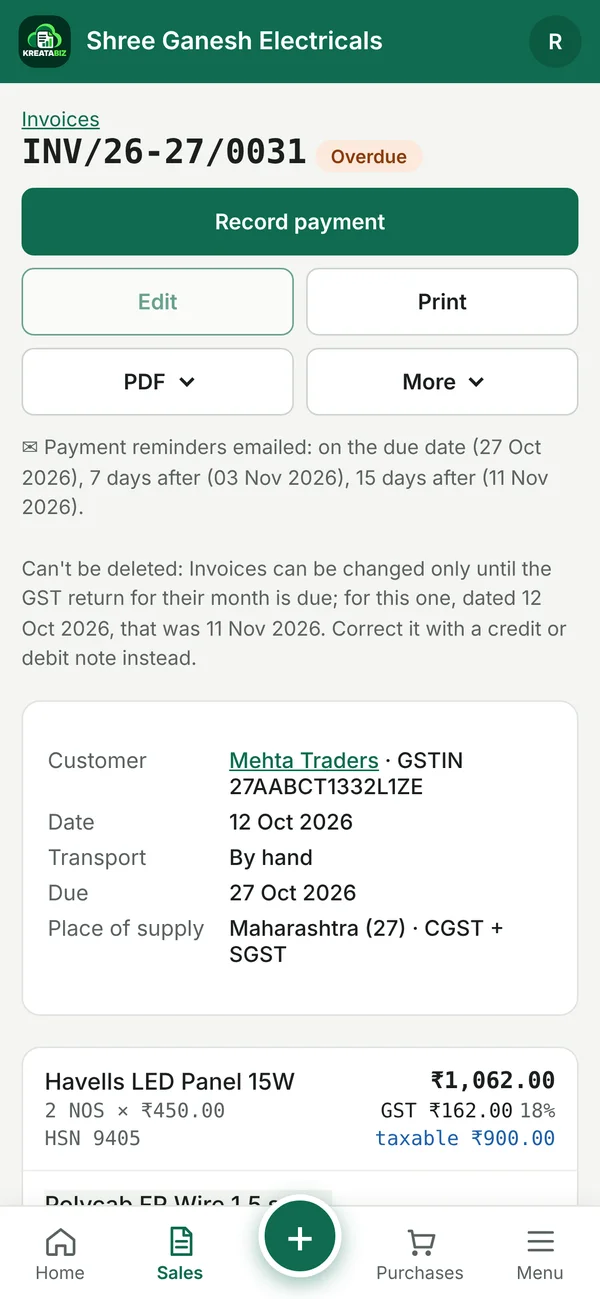
Rent, AMC and retainers invoiced and emailed by themselves every month. Polite payment reminders go out on the due date, and 7 and 15 days after, until the customer pays.
Start in minutes
Bring your customers, vendors and items, with opening balances and stock, from Excel or your old software (Tally, Vyapar, Busy…). You check every row before anything is added.
New in KreataBiz
Less typing, fewer phone calls chasing payments, and month-end done in minutes. Every screen works the same on your phone: switch on See on phone under any picture.
Bank reconciliation
Your bank statement, matched in one click
Download the statement from net banking as Excel and upload it. KreataBiz pairs each line with the receipt, payment or expense it belongs to, using the amount, date, cheque no. or UTR and the party's name.
- Missing entries in seconds. Bank charges, interest, an ATM withdrawal or a customer's NEFT you forgot: pick what it is and it is entered with the bank's date.
- The BRS, done for you. Cheques not yet cleared and the bank's balance against yours, as PDF or Excel for your CA.


Repeating invoices & payment reminders
Invoices that send themselves, and reminders that chase for you
Rent, AMC or a monthly retainer? Set it once: on each date KreataBiz makes the invoice, posts it and emails it to the customer.
- Automatic payment reminders on the due date, and 7 and 15 days after, one polite email per customer listing what's unpaid. They stop the moment the customer pays.
- You stay in control. Pause, change or stop any repeating invoice; leave out any customer from reminders.


Import from Excel
Switch from your old software in an afternoon
Customers, vendors and items, with opening balances and opening stock, from a spreadsheet or an export from Tally, Vyapar or Busy. Column names are recognised however your old software calls them.
- Nothing goes in unchecked. You see every row first: what will be added, what's already there, and anything with a problem (a wrong GSTIN) left out.


GST returns
GST returns to your CA in two clicks
GSTR-1 in the portal's upload format, GSTR-3B figures and the purchase register, for any month or quarter.
- Just the formats you need: PDF, JSON, Excel or all of them, each return in its own folder in one zip.
- Email it from KreataBiz to your accountant, with a note. The address is remembered for next month.


Easier for you. Faster for your accountant.
KreataBiz keeps proper double-entry books behind every invoice, so the work you do during the month is the work your accountant needs at month-end. No re-typing, no chasing papers.
For you
- Bill from anywhere. Make an invoice on the phone at the customer's site and share it on WhatsApp before you leave.
- Know where the money is. Who owes you, most overdue first, and what you owe, on the dashboard.
- Less chasing. Automatic reminders and repeating invoices do the follow-up for you.
- Mistakes are easy to fix. Edit an invoice or a bill until the GST return for its month is due.


For your accountant
- Their own login with the Accountant role: books, reports and GST returns, without your passwords.
- Books they recognise. Tally-style ledgers, P&L, balance sheet, TDS and depreciation, each as PDF or Excel.
- Month-end in minutes. Bank statement matched, BRS ready, GST returns emailed to them as a zip.
- Locked when filed. Entries in a month whose GST return is due can't be changed, so the figures they filed stay right.




Why KreataBiz
- Premium features, without the premium pricing. Full double-entry accounts, ledgers, GST returns, TDS and logins for your whole team: the features of costly accounting software, from about ₹14 a day + GST.
- Your entire business in your pocket. Use KreataBiz on your office computer, your laptop and your phone, all at once, with the same features and the same books on all of them. No extra licence for each device, nothing to install and nothing to copy between them: you pay only for the number of users.
- More than a billing app. Real double-entry accounts behind every invoice: P&L, balance sheet, TDS and GST returns.
- Whole team included. Plans by number of users, not per seat add-ons.
- Hosted securely on Amazon. KreataBiz runs on Amazon Web Services (AWS) servers in Mumbai, so your data stays in India: the same cloud that runs Netflix and Airbnb. Every connection is encrypted (HTTPS), your books are backed up every night and Amazon keeps a daily copy of the whole server, and you can download your own copy of each year at any time.
- Fair pricing. One clear price, GST invoice for every payment, and 2 months free when you pay yearly.
Plans and prices
Start free for 30 days. Then choose the plan for the number of people who use KreataBiz.
Free trial
- Everything in KreataBiz
- Up to 10 users, on any devices
- No card needed
- Then pick a plan, or download your data
Up to 10 users
- Up to 10 users
- Any number of phones and computers
- All features
- GST invoice for your payment
- Email support
Up to 20 users
- Up to 20 users
- Any number of phones and computers
- All features
- GST invoice for your payment
- Email support
More than 50 users? Contact us for a plan that fits your team.
Prices are before GST; 18% GST is added. Pay by UPI, card or net banking. A plan bought before your current one ends starts when it ends, so no days are lost. See refunds & cancellation.
Questions
What happens when the trial ends?
KreataBiz becomes view-only for 7 days: you can see, print and download everything, but not add entries. Choose a plan at any time to carry on with all your data. If you don't, the business is closed after those days.
Can my accountant use it?
Yes. Give them their own login with the Accountant role: they see the books, reports and GST returns.
Can I move my data out?
Yes, any time. Every financial year can be downloaded as a locked backup file, and reports and ledgers as PDF or Excel.
What if I don't renew on time?
You get reminders 7, 3 and 1 day before the end. After a paid plan ends, everything keeps working for 10 more days, then it is view-only for 7 days, so there is time to renew or to download your data.
Do I pay extra to use it on my phone and on more computers?
No. Every plan works on as many phones, laptops and computers as you like, with no licence per device. You pay only for the number of people who log in, and each person can use KreataBiz on all their devices.
Do I need to install anything?
No. KreataBiz runs in your browser on any computer or phone. On a phone you can add it to your home screen like an app.
Try KreataBiz free for 30 days
Set up your business in a few minutes and make your first GST invoice today.
Start free trial